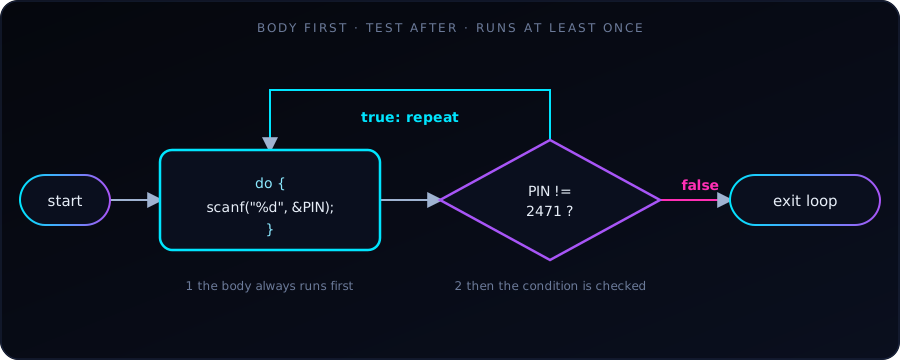
Most loops check their condition before each pass. A do-while loop does the opposite: it runs the body first and checks the condition afterwards, so the body always runs at least once.
That makes it the natural choice whenever we need to do something before we can know whether to repeat it: asking for input, showing a menu, or retrying an action. Asking for a PIN is a perfect example, because we can’t validate a PIN we haven’t read yet.
The general form is:
do {
    // body: runs at least once
} while (condition);   // note the semicolon
Example 1: keep asking until the PIN is right
#include <stdio.h>

int main(void) {
    int PIN;

    do {
        printf("Enter PIN\n");
        scanf("%d", &PIN);
    } while (PIN != 2471);

    printf("Correct PIN!\n");
    return 0;
}
A sample run:
Enter PIN
1111
Enter PIN
2471
Correct PIN!
The prompt appears once no matter what, and then again for as long as PIN != 2471 is true. With an ordinary while loop we would have to give PIN a dummy starting value first just to get inside the loop. do-while avoids that.
Example 2: limit the attempts
Real systems don’t let anyone guess forever. Here we count attempts, leave early with break on success, and lock the account after 10 failures:
#include <stdio.h>

int main(void) {
    int PIN;
    int attempts = 0;

    do {
        printf("Enter PIN: ");
        scanf("%d", &PIN);
        attempts++;

        if (PIN == 2471) {
            break;   // correct PIN: exit the loop early
        }

        if (attempts >= 10) {
            printf("Too many wrong attempts. Account locked.\n");
            return 1;   // exit the program with a failure code
        }

        printf("Wrong PIN. %d attempts left.\n", 10 - attempts);
    } while (1);   // loop "forever"; we leave via break or return

    printf("Correct PIN!\n");
    return 0;
}
A sample run (entering 1, 2, then the correct PIN):
Enter PIN: 1
Wrong PIN. 9 attempts left.
Enter PIN: 2
Wrong PIN. 8 attempts left.
Enter PIN: 2471
Correct PIN!
Here the condition is while (1), which is always true, so the loop only ends through break (success) or return (locked out). We use break to leave just this loop and return 1 to end the whole program with a non-zero exit code, the usual way to signal failure.
do-while vs while
The only difference is when the test happens. Compare what happens when the condition is false from the start:
int n = 10;

do {
    printf("do-while body, n = %d\n", n);   // runs once
} while (n < 5);

while (n < 5) {
    printf("while body\n");                 // never runs
}
Output:
do-while body, n = 10while |
do-while |
|
|---|---|---|
| Condition checked | Before each pass | After each pass |
| Minimum runs | 0 | 1 |
| Typical use | Loop while there is work to do | Ask/act first, then decide to repeat |
Common pitfalls
- Missing semicolon.
do { ... } while (cond);needs the;after the condition. Forgetting it is a compile error. - Bad input can loop forever. If the user types a letter,
scanf("%d", ...)fails and leaves the text in the input buffer, so the loop above may repeat endlessly. Real programs checkscanf’s return value (it is1on success) and clear the buffer. - A condition that never becomes false. Make sure something inside the body changes what the condition tests, or exit with
break. - Using
do-whilewhen zero passes is valid. If the loop should be skipped when there is nothing to do, usewhileorforinstead.
Key takeaway
do-while = do the body, then decide whether to repeat. Use it when the body must run at least once, such as prompts, menus and retry logic. Otherwise, while or for is usually clearer.