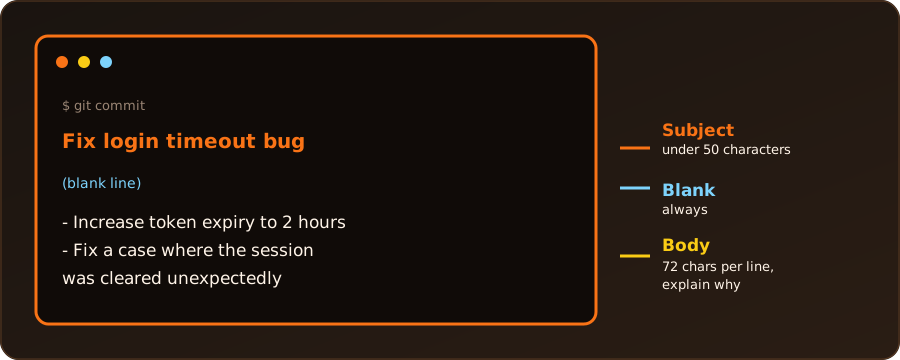
A one-line git commit -m "..." is fine for tiny changes. When a change needs explaining, a commit message has a subject (one short line), a blank line, and a body (the details). Git offers four ways to write one. I tried each in a fresh repository, and the messages below are what git log showed.
Method 1: The Default Text Editor (Recommended)
Leave out -m entirely:
git commitGit opens our editor (Vim, Nano, VS Code, …) with a template. We type the subject on the first line, leave the second line blank, write the body from line 3, then save and close to finish the commit. An empty message aborts the commit. Lines that start with # are comments and are removed.
To choose the editor once and for all:
git config --global core.editor "nano"
git config --global core.editor "code --wait"   # VS Code
This is the most comfortable method for long messages, because we can see the whole message and edit it freely.
Method 2: Several -m Flags
Each -m becomes its own paragraph, with a blank line between them:
git commit -m "Add authentication feature" -m "This paragraph explains why the change was made."Result in git log:
Add authentication feature

This paragraph explains why the change was made.
The first -m is the subject and the rest are body paragraphs. It is quick, but each -m is a single paragraph, so it is awkward for bullet lists.
Method 3: Quotes That Span Several Lines
Open the quotes, press Enter inside them to start a new line, and close the quotes at the end. The shell shows a > continuation prompt (fish just continues on the next line):
git commit -m "Fix login timeout bug

- Increased token expiration to 2 hours
- Resolved edge case where session cleared unexpectedly"
Result:
Fix login timeout bug

- Increased token expiration to 2 hours
- Resolved edge case where session cleared unexpectedly
This worked in bash and in fish. Remember the blank line after the subject: press Enter twice. In bash and zsh we can also write \n explicitly with the $'...' form (plain "...\n..." does not create a line break):
git commit -m $'Quoted with dollar sign\n\nBody line from ANSI-C quoting.'Method 4: Read the Message from a File
For a long message, write it in a file first (the file name does not matter), then pass it with -F:
git commit -F commit_msg.txtThe same works without a file. In bash or zsh a here-document supplies the message (-F - means “read from standard input”; the word after << marks where the message ends):
git commit -F - <<'EOF'
Add RSS link

Shown in the hero stats line.
EOF
fish has no here-documents, so pipe printf into it instead:
printf 'Add feature X\n\nBody via printf in fish.\n' | git commit -F -Both give the usual subject, blank line and body.
Check or Fix the Message
git log -1            # show the last commit with its full message
git commit --amend    # reopen the last message in the editor and rewrite it
Only amend commits that have not been pushed. Rewriting a pushed commit changes its history for everyone who pulled it.
Which Method?
| Method | Best for | Watch out for |
|---|---|---|
1. Editor (git commit) |
long, careful messages | needs an editor set up |
2. Several -m |
a subject plus one or two paragraphs | no bullet lists |
| 3. Multi-line quotes | short messages with a list, typed in the terminal | quotes inside the message |
4. -F file or stdin |
long messages, scripts | the shell syntax differs (bash vs fish) |
Best Practices for Multiline Commits
- Subject: about 50 characters or fewer, starting with a capital letter, without a final period. Use the imperative mood, as if giving an order: “Fix bug”, not “Fixed bug”.
- Blank line: always leave line 2 empty. Git and many tools (
git log --oneline, GitHub) treat the first paragraph as the title and the rest as the body. - Body: wrap lines at about 72 characters and explain why the change was made and what it achieves, rather than how it was coded. The code already shows the “how”.