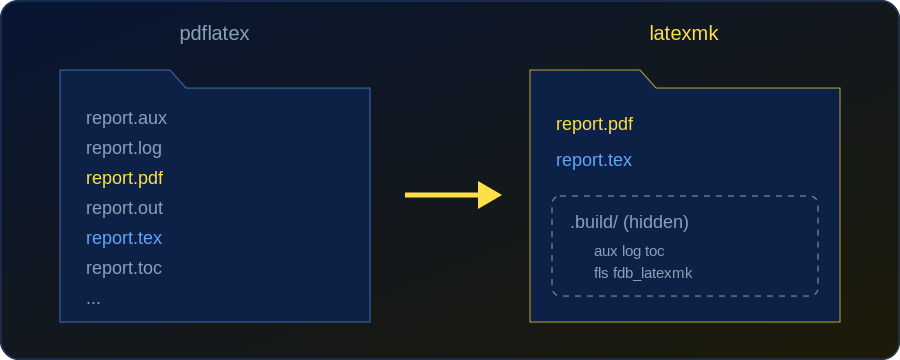
latexmk, the helper files move into a hidden folder and only the source and the PDF stay in view.The problem
We compile one small file with a table of contents:
pdflatex report.tex
ls -A
and the folder now holds this:
report.aux
report.log
report.pdf
report.tex
report.toc
With a dozen documents in the same folder, finding a .tex or .pdf file gets tiring.
LaTeX needs most of these files. The .aux and .toc files carry page numbers and references from one run to the next, and the .log file records errors and warnings. So the aim is not to stop them from being written, but to put them somewhere else.
Make it permanent
Typing those options every time is no fun. We can save them in a file named .latexmkrc in the home folder:
$pdf_mode = 1;        # build PDFs with pdflatex
$aux_dir  = '.build'; # helper files go here
$out_dir  = '.';      # PDF stays beside the .tex file
$do_cd    = 1;        # work in the .tex file's folder
From then on, this is enough, for a file in any folder:
latexmk path/to/report.texThe settings apply to all our documents. To limit them to one project, we can put the same lines in a file named latexmkrc in the project folder and run latexmk from there.
If we build from an editor, we need to set its build command to latexmk. Plain pdflatex does not read this file.
Cleaning up
To delete the helper files but keep the PDF:
latexmk -c report.texA capital -C deletes the PDF as well:
latexmk -C report.texThe small -c also helps when we have already compiled with plain pdflatex and want to clear the clutter from a folder.
Keep Git clean too
If the project is in a Git repository, one line in .gitignore leaves the whole folder out:
.build/Why not -output-directory?
pdflatex has an option to write into another folder:
mkdir -p out
pdflatex -output-directory=out report.tex
It moves everything, including the PDF, so the clutter and the file we want end up together again. The folder also has to exist before the run. The latexmk setup above separates the two for us.