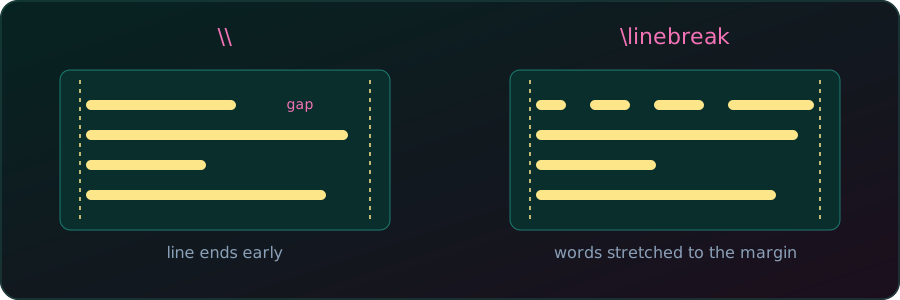
\linebreak stretches the line to reach it.In LaTeX, pressing Enter once does nothing: a single newline in the source is treated as a space. To start a new line we need a command. Which one depends on what we want the text around the break to look like.
\\ and \newline: break now, leave the line short
First line\\
Second line
Both commands end the current line at once and continue on the next line, without starting a new paragraph. The line is not stretched, so it ends early and leaves an empty space at the right.
Two useful variants of \\:
\\[2ex]adds extra vertical space after the break.\\*also forbids a page break right after the line.
Title\\[2ex]
Text that starts a little lower.\linebreak: break now, stretch the line
This text is broken here\linebreak and the rest continues on the next line.\linebreak also ends the line at that spot, but it stretches the spaces so the line reaches the right margin. With only a few words on the line, the gaps become large and ugly:
This       text      is     broken      here
and the rest continues on the next line.
It takes an optional strength from 0 to 4, written \linebreak[n]. A value of 4, the default, forces the break. Smaller values only request one, which LaTeX may ignore.
A new paragraph: blank line or \par
End of the first paragraph.

Start of the second paragraph.
A blank line in the source (or the \par command) ends the paragraph. Depending on the document class, the next paragraph gets an indent or extra vertical space. If we only want the next line, not a new paragraph, we should not use a blank line.
Inside tables
In a tabular, \\ ends the row, not just the line:
\begin{tabular}{ll}
  a\\b & c \\
  d & e
\end{tabular}
This gives three rows: a, then b c, then d e. To break a line inside one cell, the column must be a paragraph column such as p{3cm}, and we use \newline:
\begin{tabular}{p{3cm}l}
  first\newline second & x \\
\end{tabular}
first x
secondIn an ordinary l, c or r column, \newline has no effect, and the cell stays on one line.
Comparison
| Command | Effect | Right margin |
|---|---|---|
\\, \newline |
Ends the line at once | Line stays short |
\\* |
Ends the line at once, no page break after it | Line stays short |
\\[2ex] |
Ends the line, adds vertical space | Line stays short |
\linebreak |
Ends the line at once | Line is stretched |
blank line, \par |
Ends the paragraph | Last line stays short |
For spacing between lines or paragraphs, avoid stacking \\ commands. Use \\[length], or set \parskip and \parindent once in the preamble, so the layout stays consistent.