Pie Chart vs Bar Chart: When to Use Each (with ggplot2 Examples)
When a pie chart is appropriate, why a bar chart is usually the safer choice, and how to draw both in R with ggplot2: parts of a whole, near-equal slices, many categories and change over time.
R
Statistics
Visualization
Author
Abdullah Al Mahmud
Published
November 1, 2026
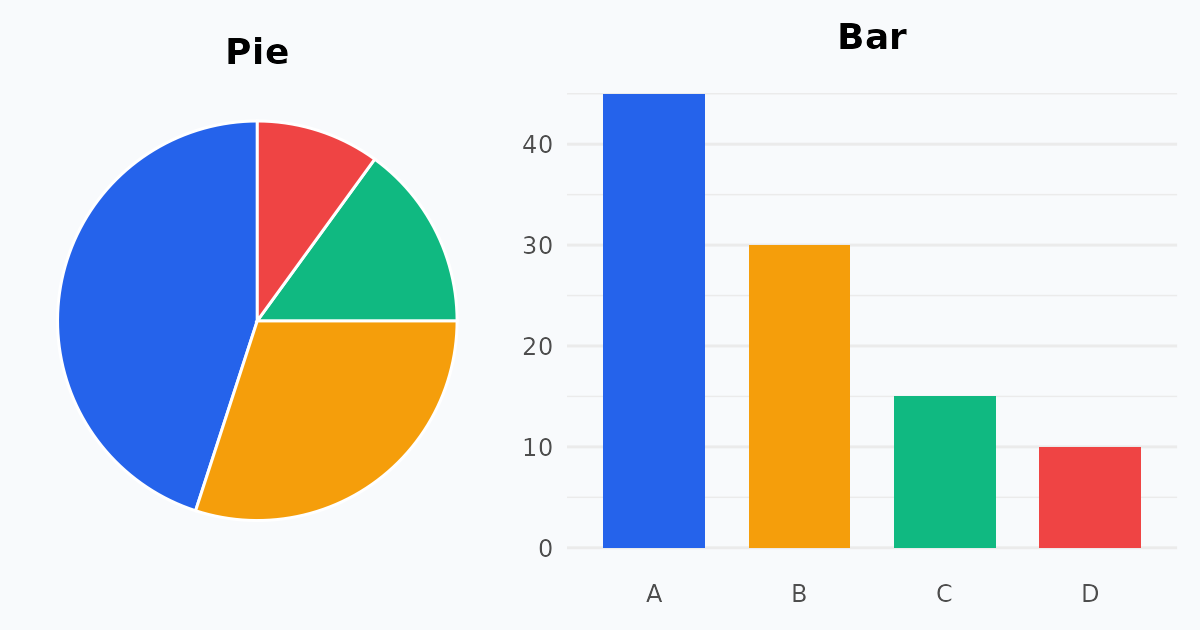
The same four numbers as a pie chart and as a bar chart.
Both charts show categories, but they answer different questions. A pie chart shows how a whole is divided. A bar chart compares values. Let’s see when each one works, and how to draw them with ggplot2.
When to Use a Pie Chart
Use a pie chart only when the categories are parts of a whole and add up to 100%.
Best conditions
There are few categories, ideally five or fewer.
We want to emphasise one dominant slice or a clear share, such as a half or a quarter.
Examples
What percentage of total company revenue comes from each product line?
What portion of the human body’s mass consists of different chemical elements?
Limitations
It is hard to read when slices are similar in size.
It becomes cluttered with too many categories.
A pie chart in ggplot2
ggplot2 has no geom_pie(). A pie chart is a stacked bar drawn in polar coordinates: one bar of width 1, then coord_polar("y").
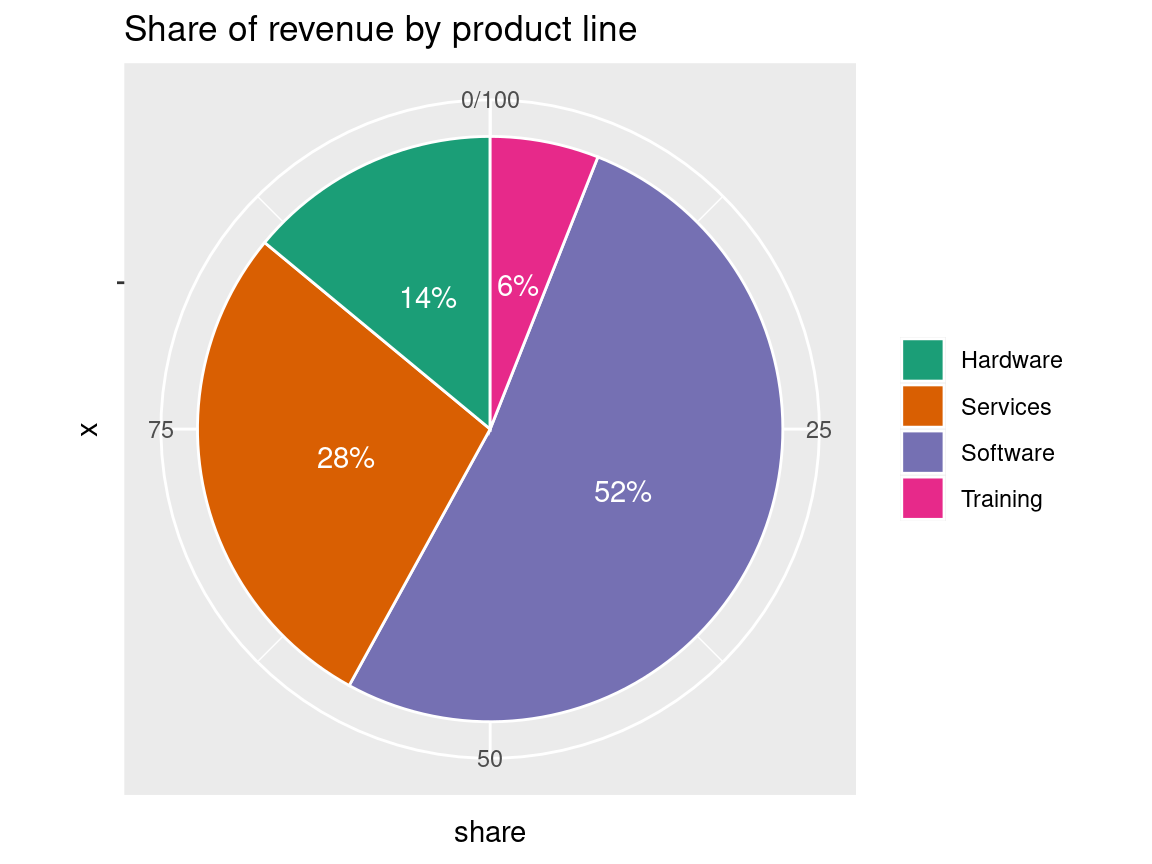
library(ggplot2)revenue <-data.frame(product =c("Software", "Services", "Hardware", "Training"),share =c(52, 28, 14, 6))ggplot(revenue, aes(x ="", y = share, fill = product)) +geom_col(width =1, colour ="white") +coord_polar(theta ="y") +geom_text(aes(label =paste0(share, "%")),position =position_stack(vjust =0.5), colour ="white") +scale_fill_brewer(palette ="Dark2") +labs(title ="Share of revenue by product line", fill =NULL)
The pie works here: four categories, one clearly dominant, and the slices sum to 100%. Even so, labelling each slice with its percentage helps, because we judge angles poorly.
When to Use a Bar Chart
Use a bar chart to compare values across categories or to follow change over time. It is the safer and clearer choice for almost all data sets.
Best conditions
We are comparing quantities, counts, averages or independent numbers.
There are many categories, or small differences that need precision.
We are showing data over time, such as monthly sales or yearly growth.
Examples
How many units did each store sell last month?
How do the average test scores compare across ten classrooms?
Advantage
Bars share a common baseline (the axis), so comparing lengths is easy and accurate.
The same data as a bar chart
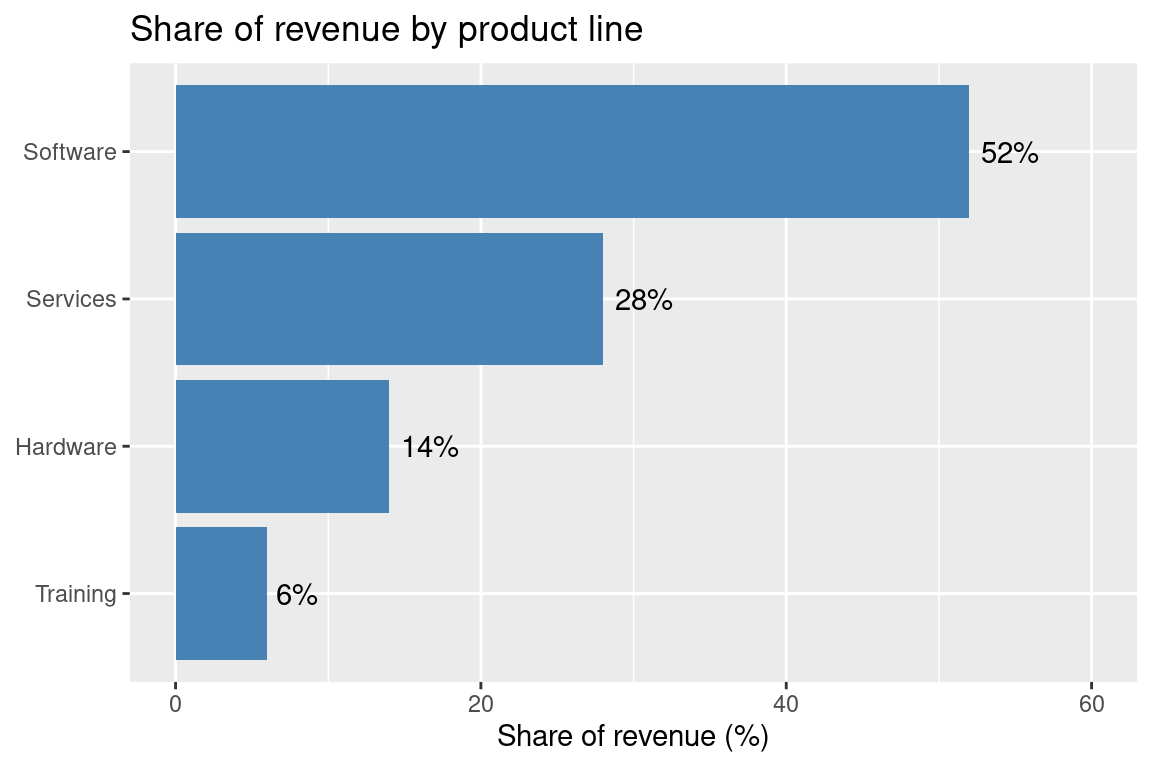
Here are the revenue shares again. Sorting the bars makes the ranking obvious.
ggplot(revenue, aes(x =reorder(product, share), y = share)) +geom_col(fill ="steelblue") +geom_text(aes(label =paste0(share, "%")), hjust =-0.2) +coord_flip() +scale_y_continuous(limits =c(0, 60)) +labs(title ="Share of revenue by product line",x =NULL, y ="Share of revenue (%)")
Where pies fail: similar slices
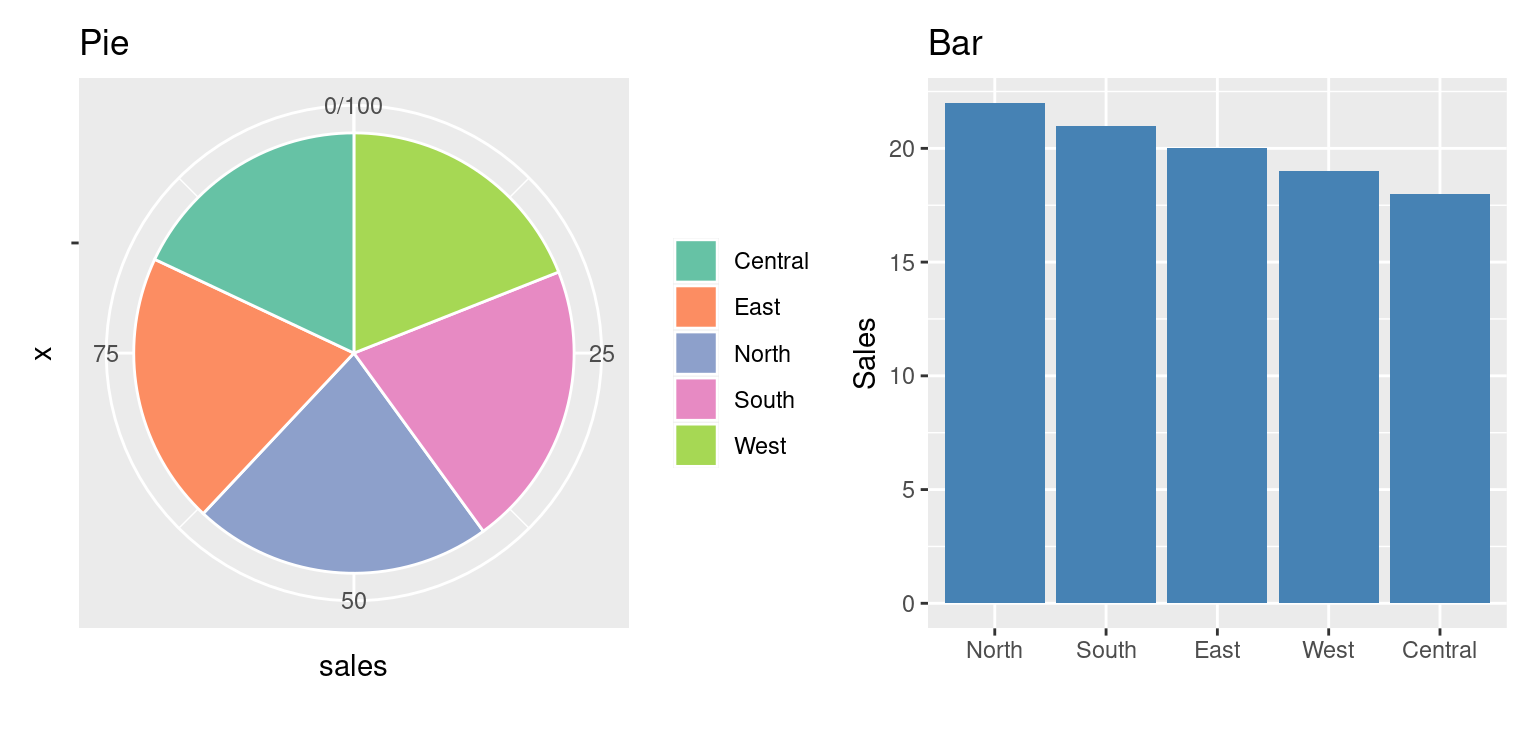
Suppose five regions have almost equal sales. We draw both charts side by side with the patchwork package (install.packages("patchwork")).
library(patchwork)regions <-data.frame(region =c("North", "South", "East", "West", "Central"),sales =c(22, 21, 20, 19, 18))pie <-ggplot(regions, aes(x ="", y = sales, fill = region)) +geom_col(width =1, colour ="white") +coord_polar(theta ="y") +scale_fill_brewer(palette ="Set2") +labs(title ="Pie", fill =NULL)bar <-ggplot(regions, aes(x =reorder(region, -sales), y = sales)) +geom_col(fill ="steelblue") +labs(title ="Bar", x =NULL, y ="Sales")pie + bar
In the pie, which region is biggest? The slices look nearly identical. In the bar chart, the ranking is immediate.
Many categories
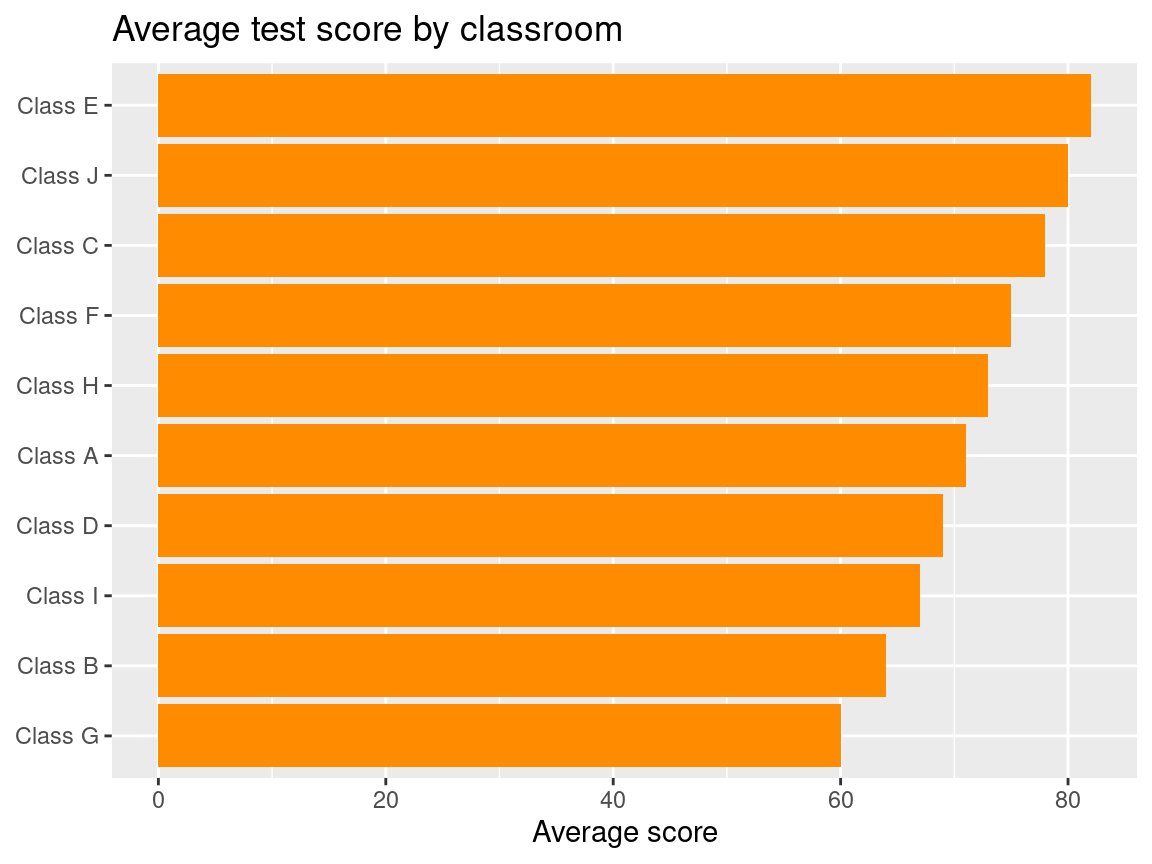
With ten classrooms, a pie would be a mess of thin slices. A horizontal bar chart, sorted, stays readable and leaves room for long labels.
scores <-data.frame(class =paste("Class", LETTERS[1:10]),mean =c(71, 64, 78, 69, 82, 75, 60, 73, 67, 80))ggplot(scores, aes(x =reorder(class, mean), y = mean)) +geom_col(fill ="darkorange") +coord_flip() +labs(title ="Average test score by classroom",x =NULL, y ="Average score")
Change over time
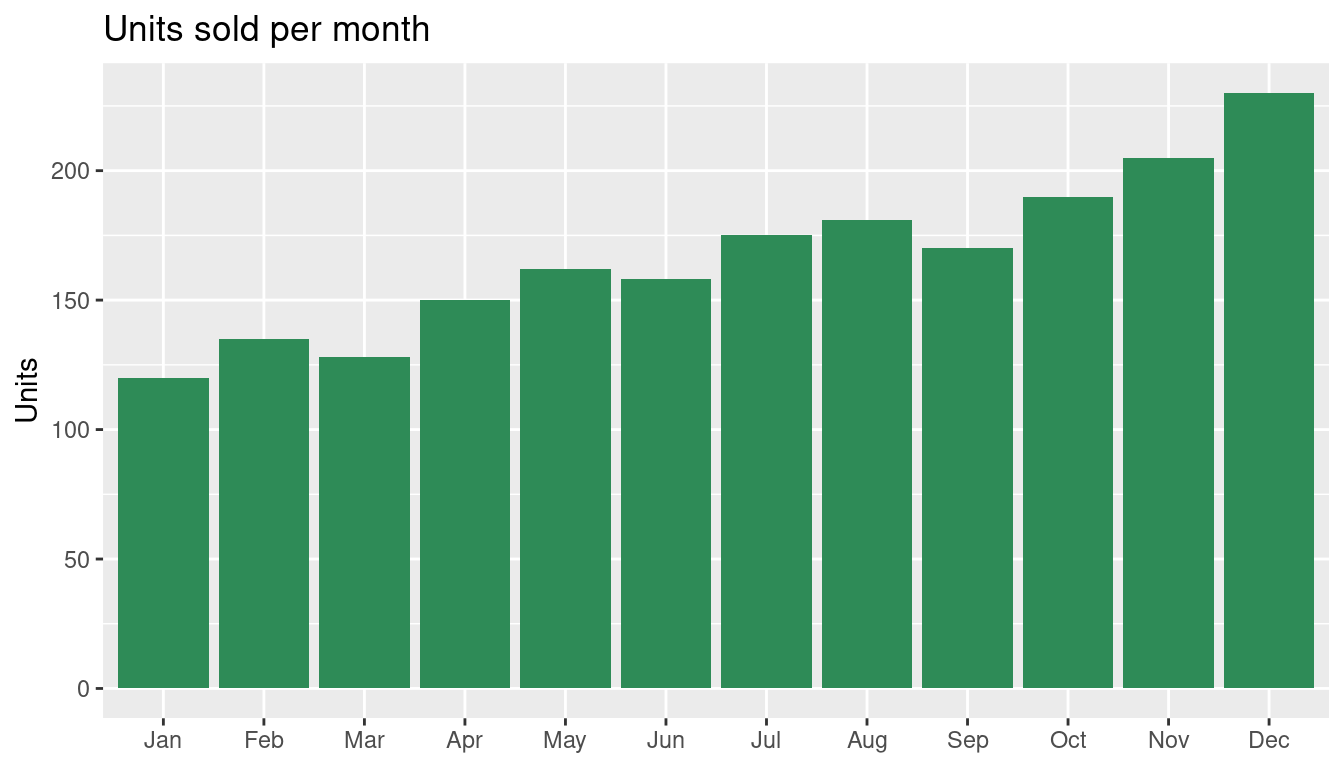
A pie cannot show a trend. A bar (or line) chart can.
sales <-data.frame(month =factor(month.abb, levels = month.abb),units =c(120, 135, 128, 150, 162, 158, 175, 181, 170, 190, 205, 230))ggplot(sales, aes(x = month, y = units)) +geom_col(fill ="seagreen") +labs(title ="Units sold per month", x =NULL, y ="Units")
Tip
Bar charts should start at zero. Truncating the axis exaggerates differences, because the reader compares bar lengths.