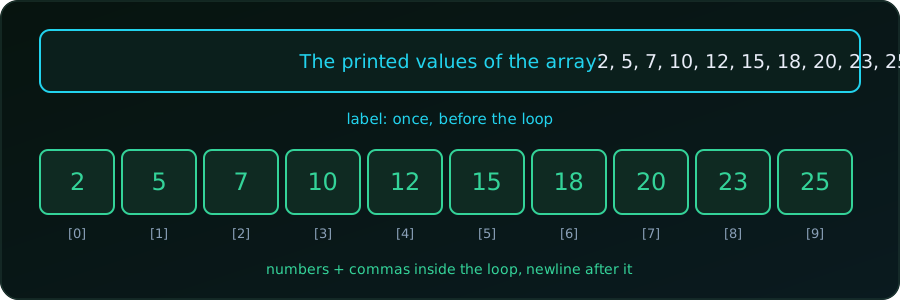
We have an array and want one tidy line of output:
The printed values of the array: 2, 5, 7, 10, 12, 15, 18, 20, 23, 25Our first attempt puts the whole message inside the loop:
#include <stdio.h>

int main(void) {
    int FixedArr[10] = {2, 5, 7, 10, 12, 15, 18, 20, 23, 25};

    for (int val = 0; val < 10; val++) {
        printf("The printed values of the array: %d, ", FixedArr[val]);
    }
    return 0;
}
Output:
The printed values of the array: 2, The printed values of the array: 5, The printed values of the array: 7, ...(Every program in this post was compiled with gcc -Wall -Wextra and run; the outputs are real.)
Why the label repeats
The body of a loop runs once per element, and printf prints its whole format string every time. The label is part of that string, so it is printed ten times. We want it once.
Anything that should appear once goes outside the loop. The loop body should print only what repeats for each element.
So the label goes before the loop, the numbers and separators go inside, and the final newline goes after.
Fix 1: Label before the loop
printf("The printed values of the array: ");
for (int val = 0; val < 10; val++) {
    printf("%d, ", FixedArr[val]);
}
printf("\n");
The printed values of the array: 2, 5, 7, 10, 12, 15, 18, 20, 23, 25,This is the label problem solved, but the line still ends with a trailing comma and space. For quick debugging that is fine. For output people read or programs parse, we want the comma only between numbers.
Removing the trailing comma
The idea is the same in each fix: print the separator before every element except the first, or after every element except the last.
Fix 2: A first flag
printf("The printed values of the array: ");
int first = 1;
for (int val = 0; val < 10; val++) {
    if (!first) printf(", ");
    printf("%d", FixedArr[val]);
    first = 0;
}
printf("\n");
The printed values of the array: 2, 5, 7, 10, 12, 15, 18, 20, 23, 25The flag is 1 only for the first element, so the first number gets no comma before it. It makes no assumption about the array size or about which values are printed, which makes it the most robust choice.
Fix 3: Choose the separator with ?:
printf("The printed values of the array: ");
for (int val = 0; val < 10; val++) {
    printf("%d%s", FixedArr[val], val < 9 ? ", " : "");
}
printf("\n");
Same output, no extra variable. %s prints ", " after every element except the last one (index 9), where it prints an empty string. The catch is that the number 9 is hard-coded, so we must change it whenever the size changes. Better to use a size variable:
int n = 10;
for (int val = 0; val < n; val++) {
    printf("%d%s", FixedArr[val], val < n - 1 ? ", " : "");
}
Fix 4: A leading separator
printf("The printed values of the array:");
for (int val = 0; val < n; val++) {
    printf("%s%d", val ? ", " : " ", FixedArr[val]);
}
printf("\n");
Here the label has no trailing space. For the first element (val is 0, which counts as false) ?: prints a single space; for every other element it prints ", ". This is the shortest clean form, but it is also the hardest to read at a glance.
Fix 5: An if after the number
printf("The printed values of the array: ");
for (int val = 0; val < n; val++) {
    printf("%d", FixedArr[val]);
    if (val < n - 1) printf(", ");
}
printf("\n");
Same output again, and probably the easiest version to read: print the number, then add a comma unless it was the last one.
All of Fixes 2 to 5 print exactly:
The printed values of the array: 2, 5, 7, 10, 12, 15, 18, 20, 23, 25Use the array size, not 10
In the examples above we wrote val < 10 to match the array. If the array later grows, every 10 must be found and changed. Let C compute the count:
int n = sizeof FixedArr / sizeof FixedArr[0]; // 10sizeof FixedArr is the array’s size in bytes and sizeof FixedArr[0] is the size of one int, so the division gives the number of elements. This works only where FixedArr is a real array. Inside a function that receives the array as a parameter, it is a pointer and this trick gives the wrong answer, so pass the length as a separate argument.
Do not loop past the end. An array of 10 elements has valid indices 0 to 9. With val <= 10 the last iteration reads FixedArr[10], which does not exist. If the array is only partly filled, loop up to the number of elements we actually set, as explained in Why an Uninitialized C Array Prints Garbage.
Which one to use
| Situation | Use |
|---|---|
| Quick debug output, trailing comma is fine | Fix 1 |
| Clean output, easiest to read | Fix 5 |
| Clean output, any size or skipped items | Fix 2 (first flag) |
| Short one-liner, size known | Fix 3 or 4 |
Summary
- A loop body runs once per element, so a label inside it is printed once per element.
- Print the label before the loop, the elements inside it, and the newline after it.
- To avoid a trailing comma, print the separator between elements: with a
firstflag, a?:, or anifon the last index. - Compute the element count with
sizeof arr / sizeof arr[0]instead of hard-coding it.
For the same idea with numbers produced by a loop, and with rows in nested loops, see Printing a Comma-Separated List in C. To fill an array from a loop first, see How to Save Loop Results in an Array in C.