Shortcut Ways to Write if in C: the Ternary Operator and More
By the end of this lesson you will
- Write an if-else as one expression with ?:
- Use other if shortcuts safely
Resources
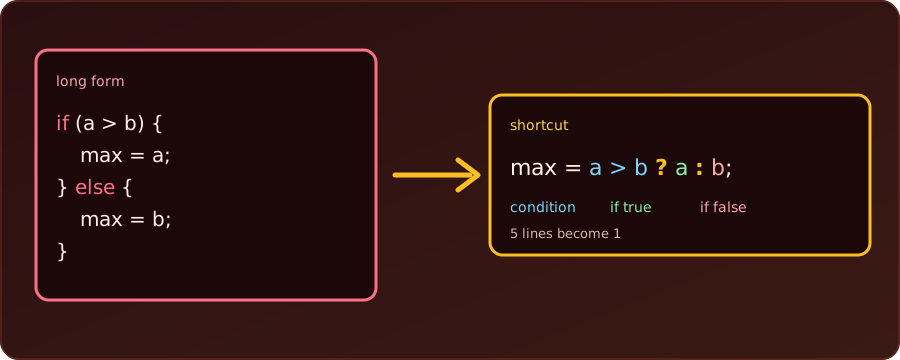
A short if takes three lines, and an if-else that only chooses a value takes five. C has a few shortcuts for these small decisions. Every program below was compiled with gcc -Wall -Wextra and run; the outputs are real. For the long form, see if-else examples in C.
1. Start Simple: Drop the Braces
Here is a very common piece of code, inside a loop that should skip the number 4. The long form:
if (i == 4) {
    continue;
}
The braces { } are needed only to group several statements. When the body is a single statement, we can leave them out, and the whole if fits on one line:
if (i == 4) continue;Same meaning, two lines shorter. In a complete program:
for (int i = 1; i <= 6; i++) {
    if (i == 4) continue;
    printf("%d ", i);
}
printf("\n");
1 2 3 5 6 The number 4 is skipped. (Section 5 shows the one trap of this shortcut.)
2. The Ternary Operator ? :
An if-else that only chooses a value can shrink too. The pattern is condition ? value_if_true : value_if_false. It is an expression: it produces a value we can assign, return or print. First, the long form:
int a = 7, b = 12;
int max;
if (a > b) {
    max = a;
} else {
    max = b;
}
The shortcut:
int max = a > b ? a : b;Both give 12. Read the shortcut aloud as “is a greater than b? then a, otherwise b”. Together in a runnable program:
#include <stdio.h>

int main(void) {
    int a = 7, b = 12;
    int max = a > b ? a : b;
    printf("%d\n", max);
    return 0;
}12Example: choose a word inside printf
Because it is an expression, it fits inside a function call, which is where it is most useful:
for (int n = 3; n <= 4; n++) {
    printf("%d is %s\n", n, n % 2 == 0 ? "even" : "odd");
}
int items = 1;
printf("%d item%s\n", items, items == 1 ? "" : "s");
items = 3;
printf("%d item%s\n", items, items == 1 ? "" : "s");
3 is odd
4 is even
1 item
3 itemsThe second pattern, adding an s only when the count is not 1, is a classic.
Example: absolute value and clamping
int n = -5, low = 0, high = 10, x = 15;
int abs_n = n < 0 ? -n : n;
int clamped = x < low ? low : (x > high ? high : x);
printf("abs = %d, clamped = %d\n", abs_n, clamped);
abs = 5, clamped = 10The second line nests a ternary inside another: below low gives low, above high gives high, otherwise x. One level of nesting is fine; beyond that, write a normal if.
Keep it readable. A chain such as score >= 80 ? 'A' : score >= 60 ? 'B' : 'C' works (it printed A for 85), but three or more levels are harder to read than the if/else if they replace. The ternary is a shortcut for a simple choice between two values. It is not a replacement for if when the branches do things (several statements, loops, return).
3. Test a Value Directly
In C, zero is false and any other value is true. So we don’t need to compare with 0:
int count = 3, done = 0;
if (count)  printf("count is non-zero\n");   // same as count != 0
if (!done)  printf("not done yet\n");        // same as done == 0
count is non-zero
not done yetif (x) means “x is not zero”; if (!x) means “x is zero”. Use it for flags and counts; for a number where zero is a meaningful value (a score, a temperature), the explicit != 0 is clearer.
4. A Comparison Is a Number
A comparison gives 1 when true and 0 when false, so it can be stored or added:
int year = 2100;
int leap = (year % 4 == 0 && year % 100 != 0) || year % 400 == 0;
printf("%d leap? %d\n", year, leap);

int a = 5, b = 3;
printf("a > b gives %d, a < b gives %d\n", a > b, a < b);

// counting with a condition: no if needed
int nums[] = {4, 9, 2, 7, 10, 3}, big = 0;
for (int i = 0; i < 6; i++) {
    big += nums[i] > 5;
}
printf("numbers above 5: %d\n", big);
2100 leap? 0
a > b gives 1, a < b gives 0
numbers above 5: 3big += nums[i] > 5; adds 1 for every element above 5 and 0 otherwise, replacing if (nums[i] > 5) big++;. (2100 is not a leap year: divisible by 100 but not by 400.)
5. The Trap of Braces-Free if
The shortcut in section 1 works because the body is a single statement. The trap is adding a second one later. Only the first statement after the if belongs to it, whatever the indentation says:
int n = -1;
if (n > 0)
    printf("one\n");
    printf("two (always printed!)\n");
two (always printed!)n is not positive, yet the second printf runs, because it is not part of the if. With -Wall, gcc even warns: this 'if' clause does not guard... [-Wmisleading-indentation]. The fix is to keep the braces whenever the body might grow:
if (n > 0) {
    printf("one\n");
    printf("two\n");
}
6. Lookup Instead of if/else if
When a number picks one of several fixed texts, an array beats a chain of ifs:
int month = 3;
const char *name[] = {"Jan", "Feb", "Mar", "Apr"};
printf("%s\n", name[month - 1]);MarPrecedence and Type Pitfalls
int x = 4;
int r = x % 2 == 0 ? 10 : 20;
int p = 1 + x > 3 ? 100 : 200;   // 1 + x is computed, then > 3, then ?:
printf("%d %d\n", r, p);
printf("%.1f\n", 5 > 3 ? 1.5 : 2);
10 100
1.5?:has low precedence: the whole condition is evaluated first. When in doubt, add parentheses around the condition, and around a ternary used inside a bigger expression.- If the two values have different types (
1.5and2), the result takes the common type (double). Use the matching format (%.1f, not%d).
Summary
| Shortcut | Replaces | Use when |
|---|---|---|
x = c ? a : b; |
if (c) x = a; else x = b; |
choosing one of two values |
printf("%s", c ? "yes" : "no"); |
an if around two printfs |
picking text inside output |
if (x) / if (!x) |
x != 0 / x == 0 |
flags and counts |
count += cond; |
if (cond) count++; |
counting matches |
if (c) stmt; |
if (c) { stmt; } |
one short statement, no later additions |
name[i] |
a chain of else if |
an index selects a fixed value |
cond ? a : bis an expression that picks a value.- Use it for choosing a value, not for long branches.
- Parenthesise it inside bigger expressions.
Expression. Code that produces a value, unlike a statement such as if.