Why Use break in a while Loop If the Condition Already Stops It?
By the end of this lesson you will
- Separate a loop’s planned exit from break
- Apply break to search, sentinel, retry and menu loops
Resources
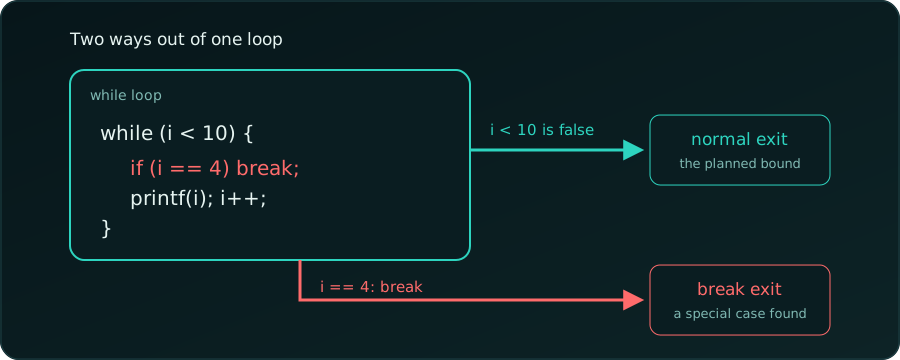
A common question when we first meet break:
int i = 0;
while (i < 10) {
    if (i == 4) break;
    printf("%d\n", i);
    i++;
}
0
1
2
3The loop stops at 4, so why did we write i < 10?
The Condition Is the Normal Exit, break Is the Special Exit
The two answer different questions:
i < 10says “keep going whileiis under 10”: the planned range.if (i == 4) break;says “but if something special happens, stop now.”
Think of driving. “Drive until we reach the destination” (i < 10) is the plan. “Stop at a red light” (break) is the exception. We don’t delete the destination from the plan because a red light might appear.
In this toy example we could simply write i < 4. Real programs rarely know the stopping point in advance, as the next examples show.
Rule. break leaves the innermost loop at once and skips the rest of the body. The program continues after the loop.
Four Short Examples
(The snippets go inside main, with #include <stdio.h>. Each was compiled with gcc -Wall -Wextra and run.)
1. Search: Stop When We Find It
We don’t know where 42 is, or whether it is there at all. We stop at the first match:
int arr[] = {7, 19, 42, 5};
int found = -1;
for (int i = 0; i < 4; i++) {
    if (arr[i] == 42) {
        found = i;
        break;
    }
}
printf("%d\n", found);2Without break the loop would keep scanning for no reason. If 42 is missing, found stays -1.
2. Read Numbers Until 0
The condition means “keep reading while the input is valid”. break means “the user typed 0”:
int x, sum = 0;
while (scanf("%d", &x) == 1) {
    if (x == 0) break;
    sum += x;
}
printf("%d\n", sum);
For the input 5 10 0 99:
15The 0 stops the loop, so 99 is never added.
3. Retry with a Limit
“At most 3 tries” is the plan; “stop as soon as it works” is the discovery. Here the second try pretends to succeed:
int tries = 0;
while (tries < 3) {
    tries++;
    if (tries == 2) break;   // pretend it worked
}
printf("%d\n", tries);2Change the test to tries == 5 and the loop ends by its condition, printing 3.
4. An Endless Loop with an Exit
When there is no natural condition (a menu, a game loop), while (1) runs until break:
char cmd;
while (1) {
    scanf(" %c", &cmd);
    if (cmd == 'q') break;
    printf("%c\n", cmd);
}
For the input a b q c:
a
b
Here break is the exit condition. (A real program should also stop when scanf fails, such as at the end of the input.)
Which Stop Goes Where?
| Kind of stop | Where it goes | Example |
|---|---|---|
| Planned stop (known up front) | loop condition | i < 10, scanf(...) == 1 |
| Discovered stop (found mid-loop) | break |
found the item, user typed 0 |
| No natural condition | while (1) + break |
menu loop, game loop |
Summary
A while condition says when to keep going in the normal case. A break says stop immediately when a special case shows up. The special case often can’t be checked in the condition, because it is only known once we are inside the loop.
For more practice, see while loop practice problems.
- The condition is the planned exit;
breakis the special-case exit. while (1)with abreaksuits menus and retries.breakleaves only the innermost loop.
Innermost loop. The loop closest around the break; outer loops keep running.